


TLDR: I took a WordPress site from 36/100 to 64/100 on Cloudflare’s agent-readiness audit by building a small plugin that adds markdown negotiation, content signals, and well-known discovery endpoints. Get Agent Kit for WordPress.
I ran Cloudflare’s agent-readiness audit on a WordPress site and got back a score of 36 out of 100. Level 1, “Basic Web Presence.” This is a build log of what I changed, why, and what I plan to do next.
What the agent-readiness audit checks
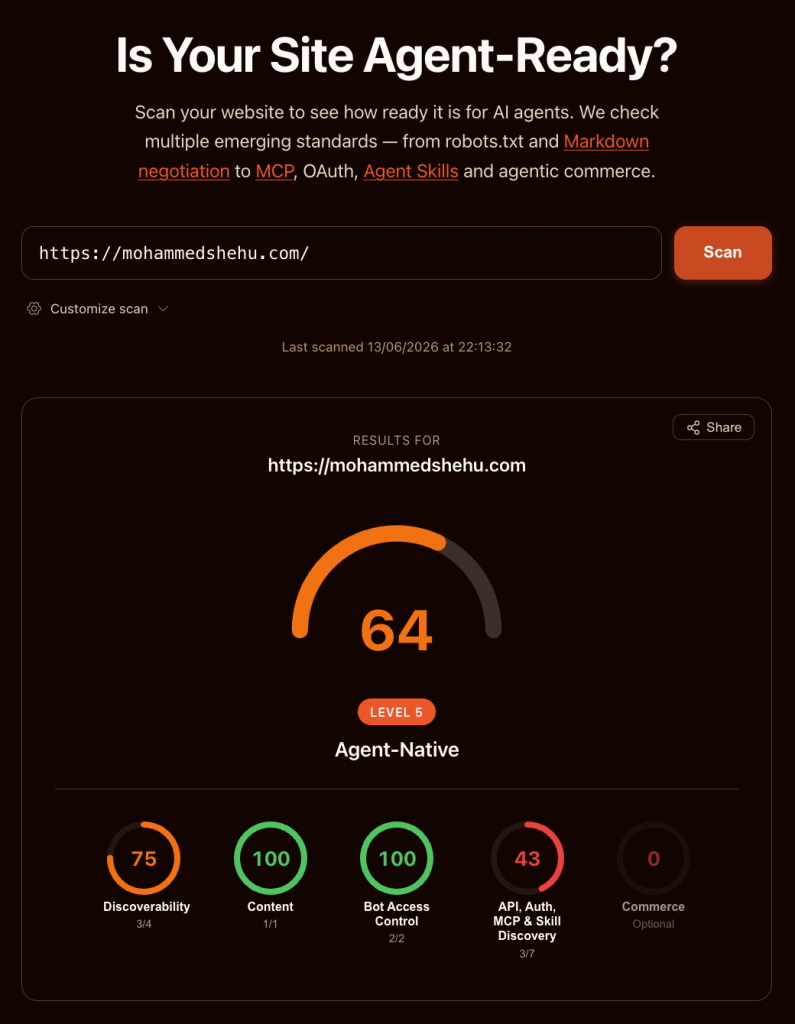
The tool scores five categories: Discoverability, Content, Bot Access Control, API/Auth/MCP and Skill Discovery, and Commerce.
My starting scores were 75, 0, 50, 0, and 0. The human-readable site structure was fine, but the audit’s content requirements were not satisfied. The rest needed work.
The first red flag was markdown negotiation. When an AI agent sends a request with Accept: text/markdown in the header, the goal is to return a markdown version of the page instead of HTML.
This is to reduce the number of tokens spent, making it cheaper (and thus more attractive) for agents to crawl your website.
Browsers don’t send that header, but agents do. The fix has to intercept those requests inside WordPress and respond with Content-Type: text/markdown plus an x-markdown-tokens: 1 header.
Why I didn’t reach for a plugin
There’s a plugin for this. There’s a plugin for most things. But a third-party plugin is a dependency I don’t control, and across multiple sites that becomes many update chains to babysit.
So I started with a site-specific plugin instead: a single PHP file with a plugin header, dropped into /wp-content/plugins/, activated once. WordPress doesn’t overwrite it during its update cycle.
The markdown hook was about thirty lines, and the robots.txt Content Signal directive was four. Both worked on the first upload.
That first version brought the score from 36 to 43.
A note on the Content Signal, since it’s the easiest win here. It’s one line added to robots.txt declaring your preferences for AI training, search indexing, and agent input:
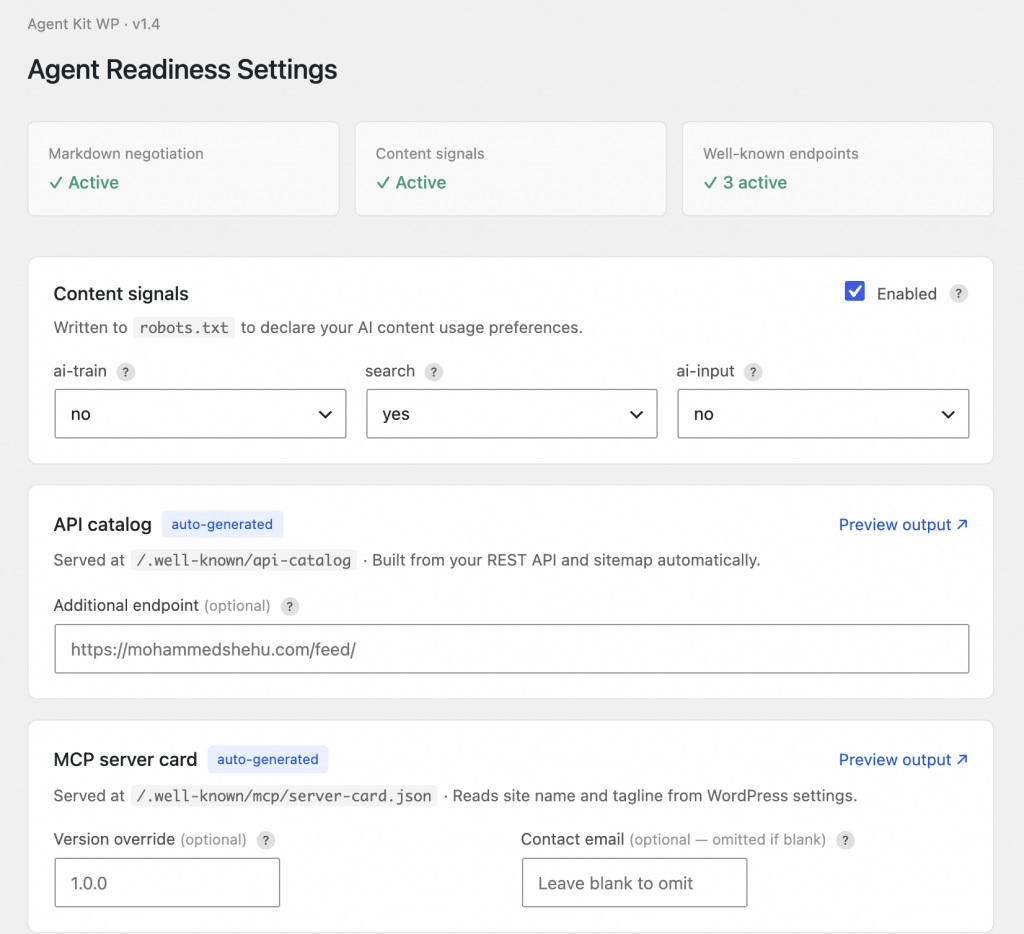
Content-Signal: ai-train=no, search=yes, ai-input=noThe catch is most SEO plugins manage robots.txt through a visual rule builder that has no field for custom directives. I added a do_robotstxt action, which appends the line to robots.txt at generation time without touching the file directly. That keeps it compatible with AIOSEO, Yoast, and anything else editing robots.txt.
The scalability problem
The moment the first fix worked, the obvious question arrived: if I hardcode site-specific JSON into a plugin, I have to maintain a different copy per site, which quickly builds technical debt.
So I considered dynamic introspection. WordPress already knows the site name, tagline, REST API root, registered post types, and sitemap URL.
A plugin that reads those at runtime produces correct output on any install with zero hardcoded values. This keeps the codebase adaptable.
The plugin serves three well-known JSON endpoints:
/.well-known/api-catalog returns an RFC 9727 linkset pointing to the REST API root, the posts and pages endpoints, and the sitemap. Built from WordPress functions.
/.well-known/mcp/server-card.json returns a SEP-1649 MCP server card with the site name, version, transport type, and capabilities. For security purposes, the contact email is optional and dropped from the output if left blank, which is the safe default.
/.well-known/agent-skills/index.json lists every public post type as an agent-callable retrieval skill. Post types come from get_post_types(). Descriptions auto-generate and can be overridden per type.
Adding the three endpoints moved API/Auth/MCP from 0 to 43 and the overall score from 43 to 64. My site was now Level 5, “Agent-Native.”
Note: The endpoints register custom rewrite rules, and WordPress only applies new rewrite rules after a permalink flush. I forgot to flush, saw low scores, and spent a confused few minutes before remembering. The eventual fix was a save notice in the plugin that reminds you to flush, with a direct link to the Permalinks page (under Settings).
Adding a UI to Simple Agent Kit
The next phase was adding a dashboard so I could visually change settings.
I added features with toggles and tooltips. Content Signals exposes three dropdowns, the Agent Skills index shows a table of post types with description overrides and include checkboxes, and the MCP card has optional version and contact fields, both labelled as omitted when empty.
My first upload threw a fatal error and took the site down (staging FTW). I had to rename the plugin folder over FTP to deactivate, debug the problem, and beef up the error handling.
The cause was PHP 8 short syntax the server’s PHP version didn’t accept. I rebuilt with PHP 7-compatible syntax, wrapped option reads in a helper with default fallbacks, and added a graceful admin notice instead of a hard failure for missing files.
The endpoints worked, but the audit still failed
The build quickly descended into debugging mode, as I tested the same plugin and settings and kept getting two different outcomes across sites.
The JSON endpoints rendered correctly when I opened them in a browser, yet the audit kept reporting that the agent skills index and MCP server card returned HTML, and that the scanner hit network errors.
It turned out there were three separate causes.
First, the firewall. NinjaFirewall flagged Cloudflare’s scanner as a suspicious bot and returned a 403 before the request reached WordPress.
Its user agent, AgentReadinessScanner, tripped the bot-scanner rule (you can check these in the firewall logs).
Second, the firewall again, in a deeper mode. One site ran NinjaFirewall in Full WAF mode, which loads through .user.ini.
The user-agent whitelist for that mode belongs in a .htninja file at the WordPress root, not in the admin UI.
Repeated reinstalls had also left a litter of orphaned php.ini.ninja* and .htaccess.ninja* backup files, which were safe to delete.
Third, and the one I’d never have guessed, my redirect plugin. It had “Redirect to URL on 404” pointed at the homepage. For human visitors that’s graceful degradation; nobody hits a dead end.
But for an external scanner it means every well-known endpoint that hasn’t flushed its rewrite rules yet returns a 301 to the homepage, which is HTML, which reads as “endpoint not found.”
I confirmed it by toggling the setting and watching the score drop, then rise again when I removed it.
| Component | The trap | The fix |
| NinjaFirewall | “Block suspicious bots/scanners” set to Yes returns 403 to the scanner | Set it to No, or whitelist the scanner’s user agent |
| NinjaFirewall (Full WAF) | Whitelisting through the admin UI doesn’t apply in Full WAF mode | Add a .htninja file at the WordPress root with a user-agent check |
| 301 redirect plugins | “Redirect to URL on 404” sends well-known endpoints to the homepage as HTML | Exclude /.well-known/*, or disable the 404 redirect |
| WordPress rewrite rules | New endpoints 404 until rules are flushed | Re-save Permalinks after activating the plugin |
The .htninja whitelist itself is small:
<?php
if ( isset( $_SERVER['HTTP_USER_AGENT'] ) &&
     stripos( $_SERVER['HTTP_USER_AGENT'], 'AgentReadinessScanner' ) !== FALSE ) {
    $nfw_unfiltered = TRUE;
}Note: The lack of a closing
?>tag is intentional.
Distribution
The plugin is live on WordPress.
The audit was the reason I opened the hood, but most of the time went on things the audit never scored: old PHP versions, orphaned firewall config, a 404 redirect I’d set years ago and forgotten, .htaccess files I hadn’t read since they were created.
It’s like car maintenance. You go in to fit one new part and end up replacing filters, clearing out the boot, and topping up fluids you’d stopped checking.
The site is faster and cleaner now in ways the score doesn’t capture, which is ultimately the better outcome.
Is your site ready for AI agents?
Most sites aren’t. We’re still dealing with new standards, thin documentation, and hidden failure modes.
I can run this audit on your site, tell you what’s blocking agents, and fix the parts worth fixing.