


TLDR: Website agent readiness is the state of a website that AI agents can read, understand, and act on with no human in the loop. Jump to the steps, or install the free Agent Kit open-source plugin for WordPress.
Today, people browse the web and click through pages. But a growing share of visitors are software agents that fetch a page, parse it, then answer a question or finish a task for someone.
An agent-ready website serves structured content, declares what AI systems may do with it, and exposes a few standard files that agents look for.
You can add each piece by hand, or install Agent Kit, a free open-source WordPress plugin I built that adds all of it for you.
On one of my own sites it moved a Cloudflare agent-readiness score from 36 to 64 in a single install, with no change to what human visitors see.
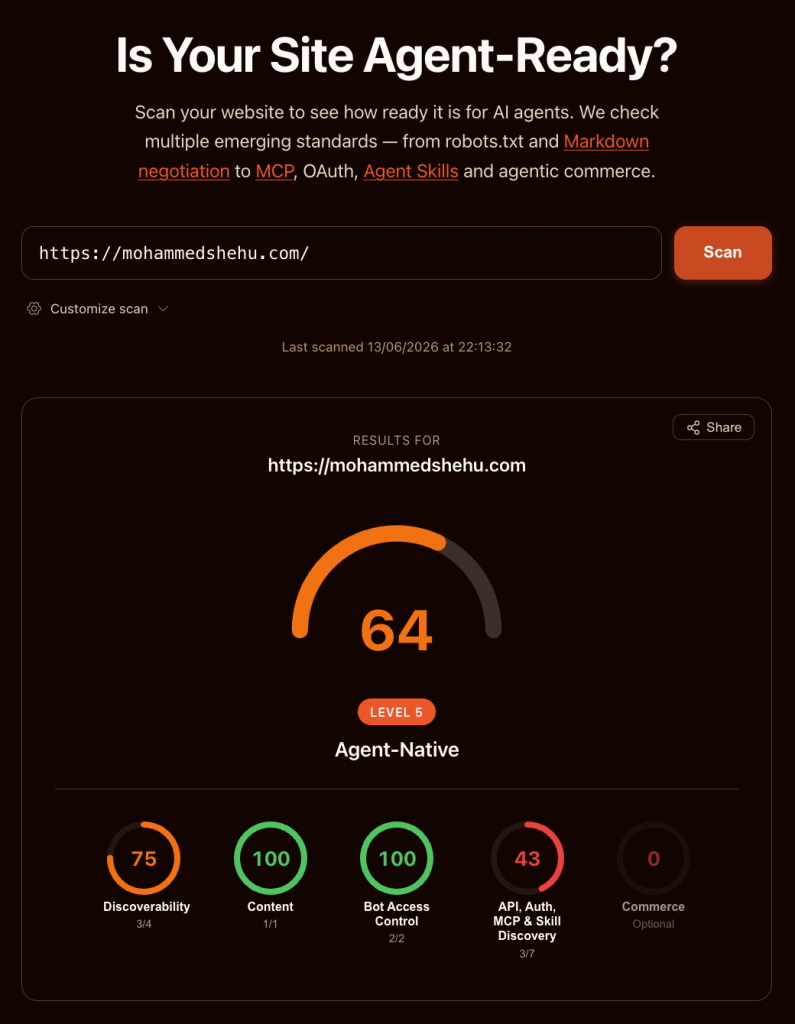
Here’s the checklist in a table.
| Item | What it means | Why it helps |
| Machine-readable content | Clear headings and plain HTML, with nothing trapped inside scripts or images | Agents parse text the way they parse a document. Messy markup may obscure your content and cost more tokens to parse. |
| A text version on request | Your site returns a plain text or markdown copy of a page when an agent asks for one | Agents read text faster and more accurately than visual pages built for human eyes. |
| Stated AI preferences | A short directive in your robots.txt file declaring your rules for AI training, search, and agent input | Agents check this file first. Silence leaves the decision to them. |
| Open access for good agents | Firewall and bot rules that block bad traffic without blocking the agents you want | Over-eager security settings often shut out the visitors you’re trying to attract. |
| Discovery files | A few standard JSON files at fixed addresses, the “well-known” paths, that list what your site offers | This is how an agent finds your services without guessing. |
What gets added or changed to your website
Agent readiness comes down to a handful of small files and headers, and none of them affect your page design.
A Content-Signal line in your robots.txt file. This one line states your rules for AI use in three areas: training, search, and agent input. Agents read it before anything else on your site, so it’s the first thing to set.
A markdown reply for agents that ask for one. When an agent requests plain text instead of a web page, an agent-ready site returns a markdown copy with the correct header.
Human browsers never send that request, so people keep getting your normal page.
Three discovery files at fixed “well-known” addresses. These tell agents what your site is and what it can do:
/.well-known/api-cataloglists your site’s interfaces and sitemap, following RFC 9727, which the IETF published in June 2025./.well-known/mcp/server-card.jsontells agent frameworks what your site offers./.well-known/agent-skills/index.jsonlists your site’s services as actions an agent can call.
Each file is small and public, and it draws on details you already have: your site name, your description, your page types, and your API address.
How to make your site agent-ready, step by step
The quick path is to install Agent Kit, which adds every item above for you and builds the correct files from your own site data.
If you’d rather do it by hand, or you’re not on WordPress, here’s the manual route.
- Run an audit first. Use a free agent-readiness audit to get a baseline score, and note which of the five categories score low so you know where to spend your time.
- Check your content. Open a few pages and confirm your headings are clear and your text lives in plain HTML, not locked inside images or scripts. Most content sites pass this step already.
- Edit your
robots.txt. Add aContent-Signalline stating your AI training, search, and agent-input rules. Any site owner can make this text edit. - Create the three discovery files. Add the three “well-known” files above, filled in with your own site details. On WordPress you can serve them with a small code snippet; on other platforms you can upload them as static files.
- Add the markdown reply. This step needs a code snippet or a developer, since it changes how your server answers certain requests. If that’s out of reach, skip it and capture the other points first, since they cover most of the score.
- Re-run the audit. Compare your new score to the baseline and fix anything still flagged.
- Check under the hood while you’re in there. Agent readiness tends to surface older problems. Look at your software versions, your firewall and security settings, any forgotten redirects, and your 404 handling. Stale firewall rules often block the helpful agents you want, and old redirects can break the discovery files before an agent reaches them. Fixing these improves your site for human visitors too.
Treat your final score as a baseline to improve on. The standards are young and will move, so you want a site an agent can read today and that you can update as the rules settle.
Why website agent readiness is becoming standard
Bot traffic on the web has overtaken human traffic, and the rules that govern it are formalising fast.
Gartner expects 33% of enterprise software applications to include agentic AI by 2028, up from less than 1% in 2024, and at least 15% of day-to-day work decisions to run autonomously through these agents by the same year.
Across Cloudflare’s network, AI bots already accounted for about 4.2% of requests for web pages in 2025, and the crawling triggered by a user’s question grew more than 15 times over the year.
Site owners are already responding: about 14% of the top domains now use robots.txt rules to manage AI crawlers, up over the year.
The checklist items above map to the categories most agent-readiness audits score: discoverability, content, bot access control, service discovery, and commerce.
A personal or business site can skip the commerce bit, which suits stores that want agents to browse and buy.
Everything else applies to any site that wants to be legible to the agentic web.