


TLDR: I built an audio processing workflow with agentic properties using FastAPI, Streamlit, and n8n. The pipeline accepts uploaded audio files, processes them through seven steps, and produces a per-job folder containing normalized audio, a transcript, and a QC report. FastAPI handles audio processing, FFmpeg subprocess calls, transcription, and job state management, while n8n coordinates HTTP requests and Streamlit provides a browsable interface.
I used to work as a voiceover artist. There’d be directors in the room, scriptwriters changing lines between takes, producers watching timing, sound engineers listening for mouth noise and room tone, and account managers thinking about client approval.
I’d have headphones on, a marked up script, and someone in my ear asking for more warmth, less pace, tighter pauses, and another take from the top. Don’t forget to smile, they can hear it in your voice.
I wanted to see how that studio workflow would translate into an agentic system, mostly as a way to automate the first technical pass. The basic pipeline would involve uploading a voiceover, processing audio, transcribing it, detecting long pauses, generating QC notes, and saving artifacts for review.
This is not a fully autonomous voiceover agent. It’s an agentic workflow prototype: a stateful, tool-using system that coordinates audio processing, transcription, QC checks, failure handling, and review artifacts.
The final build uses FastAPI for the backend, Streamlit for a local demo interface, and n8n as an HTTP orchestration layer. It’s got a thin reasoning layer (agentic autonomy is a spectrum), but can be extended later with more reasoning functionality around scriptwriting, artifact judgement, etc.
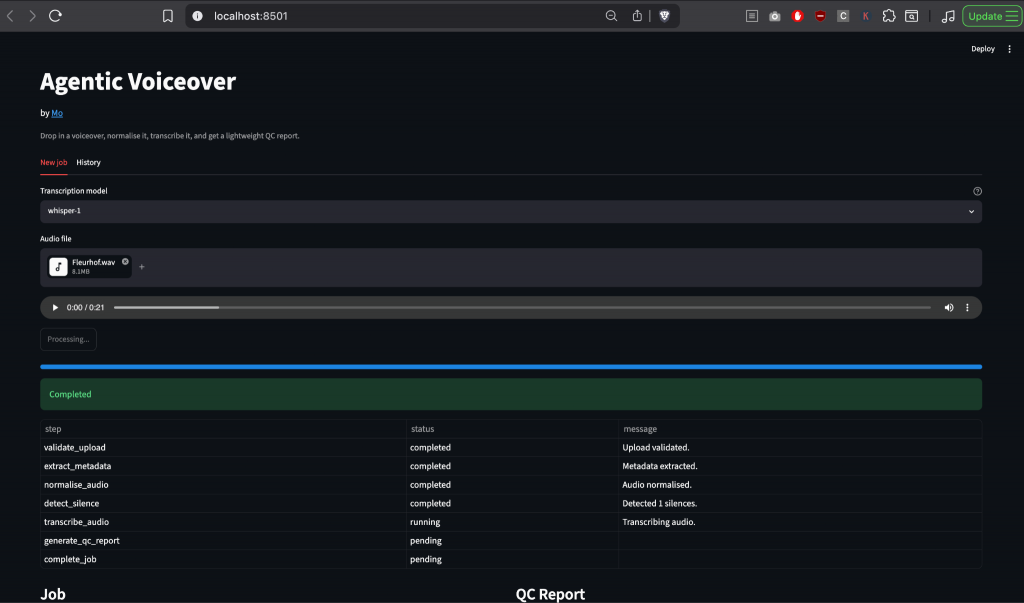
FastAPI handles file uploads, job state, FFmpeg processing, transcription, silence detection, QC report generation, progress events, and per-job output folders. Streamlit gives the human-facing interface, while n8n submits jobs, polls status, and fetches reports.
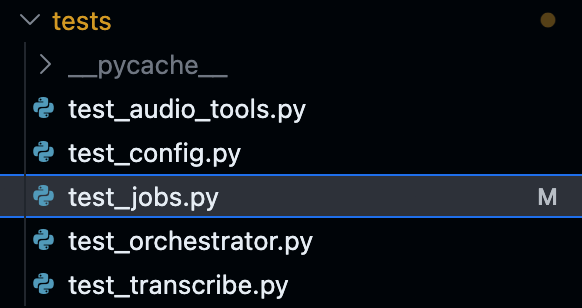
Python backend modules
The backend starts with a multipart upload that accepts .mp3, .wav, and .m4a, stores the file in uploads/, creates a UUID job, then runs the workflow in the background.
def create_job(input_file: str | None = None) -> JobRecord:
   job_id = str(uuid4())
   job = JobRecord(
       job_id=job_id,
       input_file=input_file,
       steps=[JobStep(name=name) for name in WORKFLOW_STEPS],
   )

   jobs[job_id] = job
   return job
The processing path uses seven steps: validate upload, extract metadata, normalise audio, detect silence, transcribe audio, generate QC report, and complete the job.
WORKFLOW_STEPS = [
 "validate_upload",
 "extract_metadata",
 "normalise_audio",
 "detect_silence",
 "transcribe_audio",
 "generate_qc_report",
 "complete_job"
]
Each step updates job state and publishes events.
The module split:
main.py          API routes
orchestrator.py  job flow
audio_tools.py   FFmpeg tools
transcribe.py    mock/OpenAI transcription
store.py         in-memory state
events.py        Server-Sent Events (SSE)
models.py        Pydantic schemas
artifacts.py     job output files
config.py        env settings
The output moved from one MP3 file in outputs/ to a per-job folder:
outputs/<job_id>/
  normalised.mp3
  report.md
  job.json
A person can open one job and see processed audio, transcript, QC notes, errors, and source context.
Why FastAPI?
n8n can orchestrate the workflow, but FFmpeg work belongs closer to the backend. Audio processing needs subprocess calls, file paths, parse logic, error handling, and repeatable tests, which FastAPI can handle.
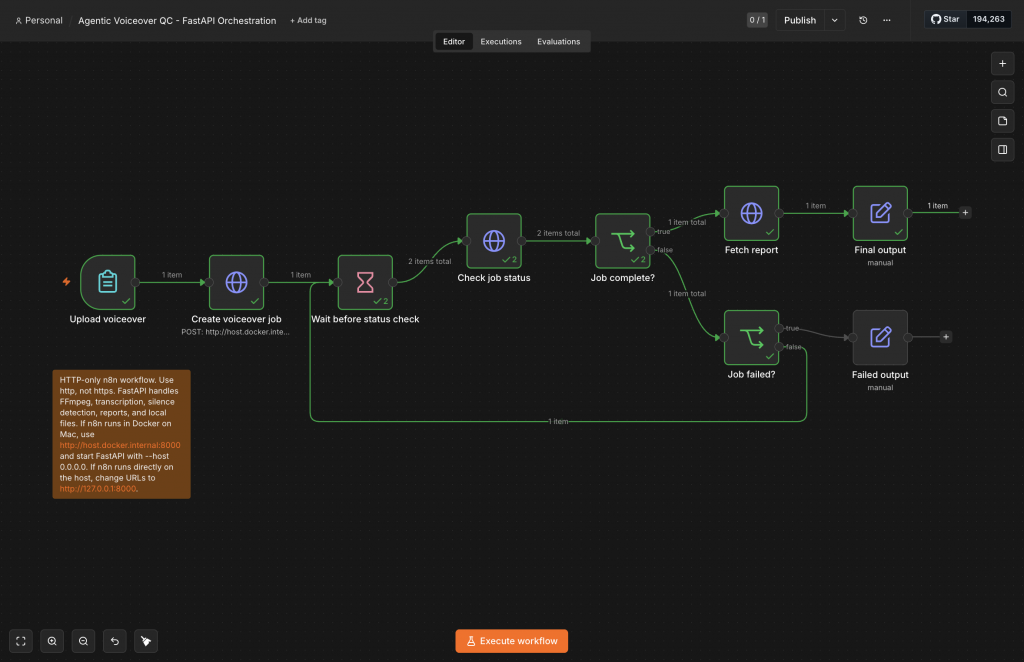
In the current iteration, n8n now does HTTP only. It accepts a manual form upload, sends the file to POST /jobs, waits a few seconds, polls GET /jobs/{job_id}, branches on completed or failed, then fetches GET /jobs/{job_id}/report.
- n8n coordinates.
- FastAPI processes.
- Streamlit demos.
- FFmpeg handles audio.
- OpenAI or mock mode handles transcription.
Fixed snags
The first snag came from curl: I posted a file without naming the multipart field. FastAPI expected file, so the correct syntax had to be:
-F "file=@/path/to/audio.wav"But a product shouldn’t depend on someone remembering multipart syntax, so I started looking at Streamlit.
Then FFmpeg failed because it wasn’t installed, which led to a startup check and failure message. A missing binary now produces a failed job with an error in job state and report artifacts.
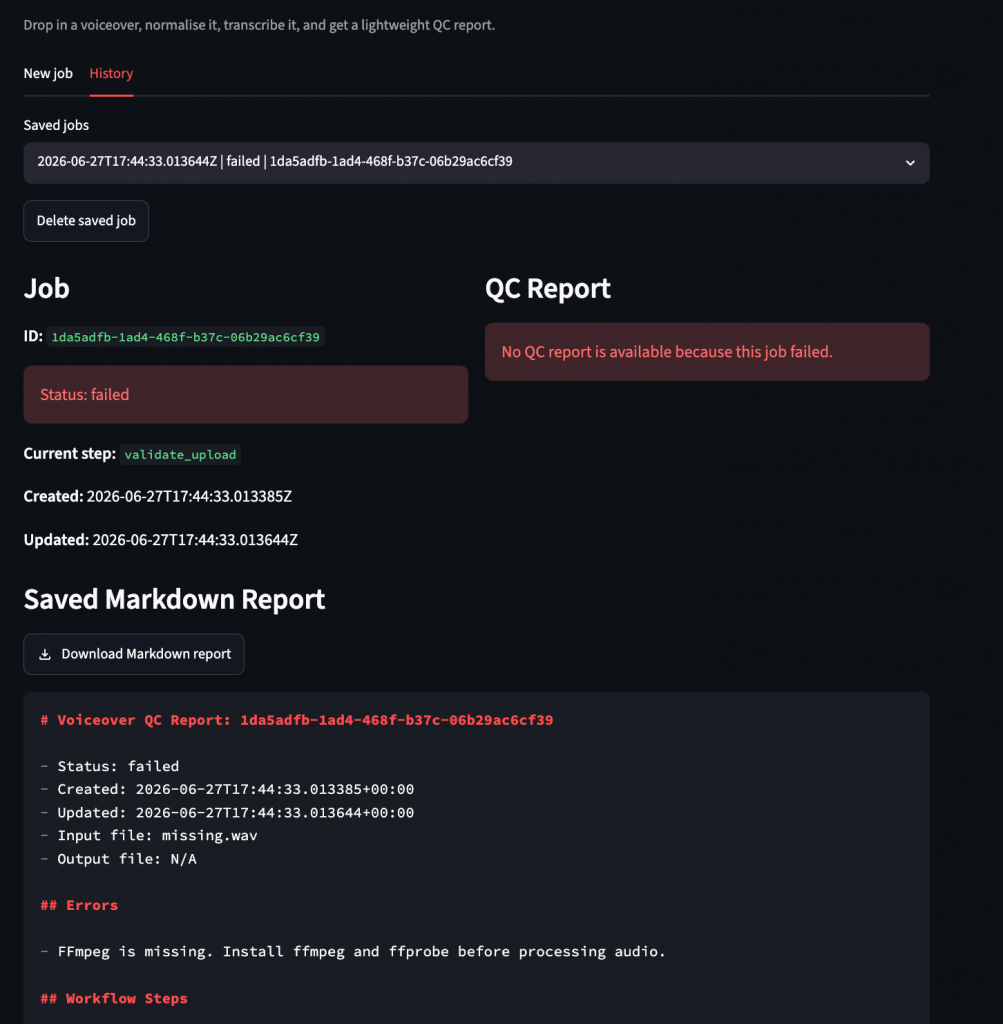
I also wanted to see historical jobs—a flat MP3 in outputs/ didn’t support history—so I added per-job folders to give Streamlit something durable to browse.
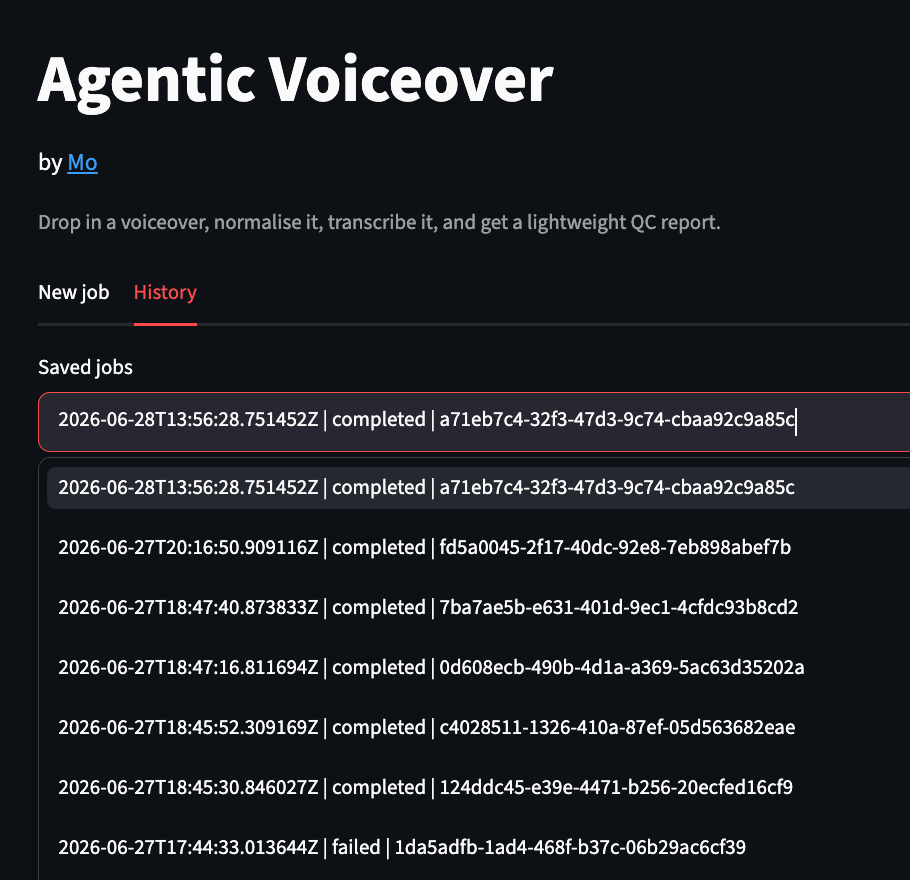
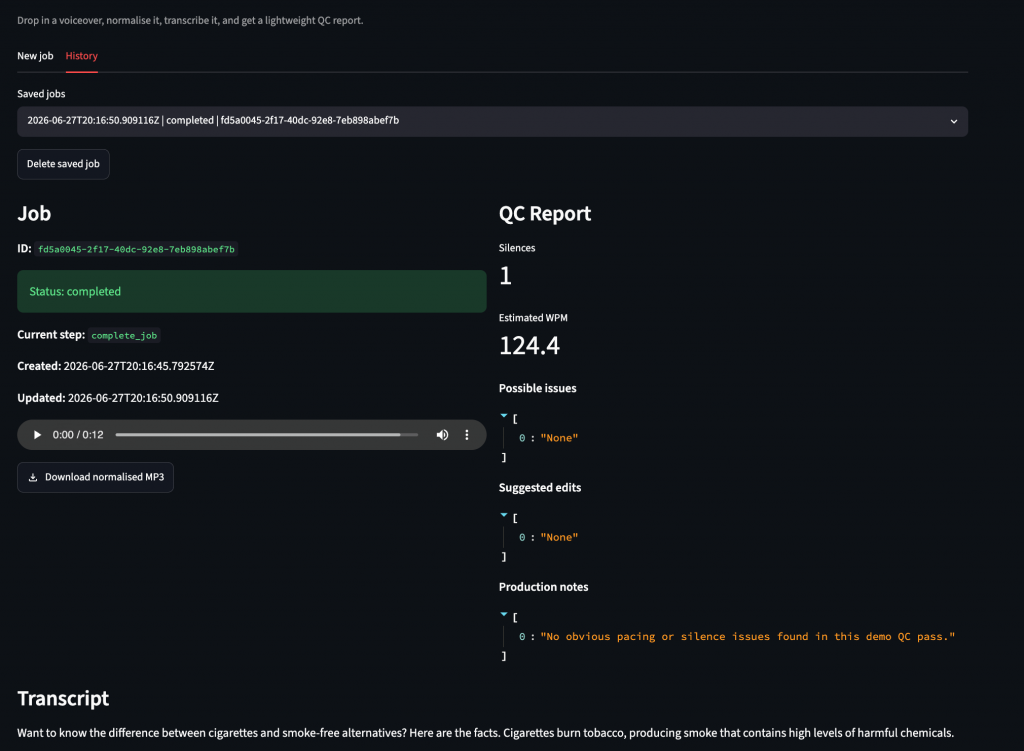
Streamlit then exposed duplicate widget keys. The same job could appear once in the current run and again in History. Download buttons keyed only by job ID collided. Prefixing keys by UI context fixed the issue:
new-job-download-audio-<job_id>
history-download-audio-<job_id>
The transcription layer broke on response format, as gpt-4o-mini-transcribe rejected verbose_json. To fix this, I mapped response formats by model:
gpt-4o-mini-transcribe -> json
gpt-4o-transcribe -> json
gpt-4o-transcribe-diarize -> diarized_json
whisper-1 -> verbose_json
That was contained inside transcribe.py.
At some point, n8n failed on networking – https://localhost:8000/jobs produced a refused connection. The backend serves HTTP, not HTTPS. And when n8n runs in Docker on Mac, localhost points at the container, not the Mac host. The working URL becomes:
http://host.docker.internal:8000/jobsThen reload:
uvicorn app.main:app --host 0.0.0.0 --port 8000 --reloadQC report
The QC report for this demo simply checks for silences and words per minute to generate suggested edits. FFprobe returns duration, format, and bitrate where available.
def normalise_audio(input_path: str, output_path: str) -> dict[str, Any]:
   Path(output_path).parent.mkdir(parents=True, exist_ok=True)
   command = [
       "ffmpeg",
       "-y",
       "-i",
       input_path,
       "-af",
       "loudnorm=I=-16:TP=-1.5:LRA=11",
       "-codec:a",
       "libmp3lame",
       "-q:a",
       "2",
       output_path,
   ]

   result = subprocess.run(command, capture_output=True, text=True, check=False)

   if result.returncode != 0:
       raise RuntimeError(result.stderr.strip() or "Audio normalisation failed.")
   return {"output_path": output_path, "success": True}
FFmpeg normalises loudness with loudnorm. The silence detector parses silencedetect stderr output and returns start, end, and duration values.
Any pause longer than 1.5 seconds gets flagged. If transcript text exists, the report estimates word count and words per minute. Below 90 WPM, it notes slower pacing; above 180 WPM, it notes faster pacing (you can tweak these thresholds). If transcription doesn’t run, it says transcription wasn’t available.
Testing
The tests use a tiny WAV generated through Python’s wave module. FFmpeg-dependent tests skip when FFmpeg isn’t available.
Coverage now checks upload behavior, failed jobs, optional n8n context fields, QC report logic, artifact writing, config defaults, and transcription response-format selection.
Notes
The more agentic parts are orchestration, state, tool execution, and report generation; the less agentic parts are planning, judgment, and feedback-based improvement.
There’s also a difference between orchestration and execution. n8n works well as a coordinator, but it didn’t own FFmpeg in this setup. FastAPI works well as the execution layer because it can manage local files, subprocesses, provider adapters, tests, and reports.
For frontend UIs, don’t forget the usual additions: disabled buttons during processing, durable widget keys, show failed states in red, give users downloads, and save reports outside memory.
Future extensions
The app still uses in-memory job state, so while disk artifacts survive, active jobs disappear on restart. A production version would need Redis, a database, or a queue worker.
There are also missing rules for file size, timeout behavior, cancellation, cleanup, retry policy, and provider cost tracking. Object storage would replace local folders, and auth and rate limits would sit in front of public endpoints.
The biggest open question concerns evaluation. Silence count and WPM are fine for a demo, but voiceover quality also involves tone, emphasis, script fit, pacing intent, pronunciation, and client direction.
The next version would need reviewer feedback, version logs, model logs, and a way to compare automated notes against human edits.